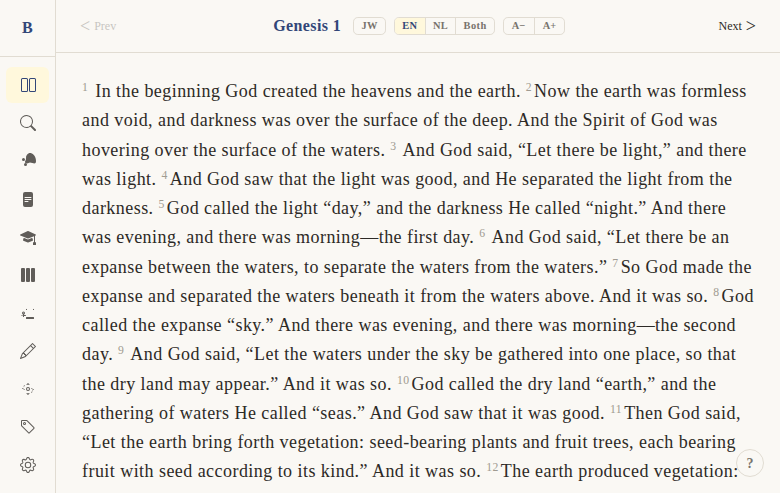
Chapter-by-chapter reading
Context
Problem: Users need a clean, focused way to read the Bible one chapter at a time without distractions — similar to reading a physical book, but with the benefits of digital navigation.
Solution: A full-screen reader view that displays one chapter at a time with verse numbers, clean typography, and simple prev/next navigation. The reader is the core experience of BibleWeb — everything else builds on top of it.
Not included: Continuous scrolling across chapters, audio playback, or split-screen commentary (those are separate features).
Functional
The reader shows one chapter of the Bible at a time. When you open BibleWeb and navigate to a book and chapter, you see the full text laid out cleanly with verse numbers.
User flow:
- User selects a book and chapter (via book picker, command palette, or URL)
- The chapter text loads with all verses displayed sequentially
- Verse numbers appear as small superscript numbers before each verse
- User reads through the chapter by scrolling
- At the bottom, prev/next chapter buttons allow navigation
- The URL updates to reflect the current book and chapter (e.g.,
/read/1/1for Genesis 1)
Edge cases:
- Genesis 1 has no "previous" button (start of Bible)
- Revelation 22 has no "next" button (end of Bible)
- Invalid book/chapter URLs redirect to Genesis 1
- The last reading position is remembered across sessions
UX & Design
Layout:
- Full-width text area with max-width for comfortable reading
- Verse numbers as superscript, slightly smaller and muted color
- Comfortable line height (1.7) and font size (user-adjustable)
- Dark theme: background #1a1a2e, text #e0e0e0
Typography:
- Body text: system monospace font, user-adjustable size (A+/A- controls)
- Verse numbers: 0.65em, color var(--color-verse-number), non-selectable
Navigation:
- Prev/Next buttons at bottom of chapter
- Keyboard: ← → arrow keys for chapter navigation
- Command palette (Ctrl+K) for jumping to any book/chapter
Responsive:
- Desktop: centered content with generous margins
- Mobile: full-width with smaller margins, touch-friendly navigation buttons
Technical
Data:
- Verses loaded server-side from Turso SQLite database
- Query:
getChapterVerses(bookId, chapter)returns ordered verses - Two built-in translations: BSB (English) and SV (Dutch)
- Translation mode stored in localStorage
Components:
+page.svelteatapps/web/src/routes/(app)/read/[[book]]/[[chapter]]/+page.svelteVerseText.svelte— renders individual verse with number and textChapterNav.svelte— prev/next navigation buttonsBookPicker.svelte— book/chapter selection
Route:
/read/[book]/[chapter]— book is 1-66, chapter is 1-N- Optional params: defaults to last read position or Genesis 1
Files:
apps/web/src/routes/(app)/read/[[book]]/[[chapter]]/+page.svelteapps/web/src/routes/(app)/read/[[book]]/[[chapter]]/+page.server.tsapps/web/src/lib/components/bible/VerseText.svelteapps/web/src/lib/components/bible/ChapterNav.svelte
Status
Current: DONE Milestone: v1 Priority: Core — this is the foundation of the entire app
History:
- Originally built in BibleGame (MonoGame C# desktop app) as
ReaderView.cs - Ported to web as one of the first features (Phase 1)
- Has been stable since initial implementation
Dependencies:
- Requires: verse database (DONE), book/chapter routing (DONE)
- Used by: all study tools (interlinear, cross-refs, commentaries attach to this view)
Screenshots