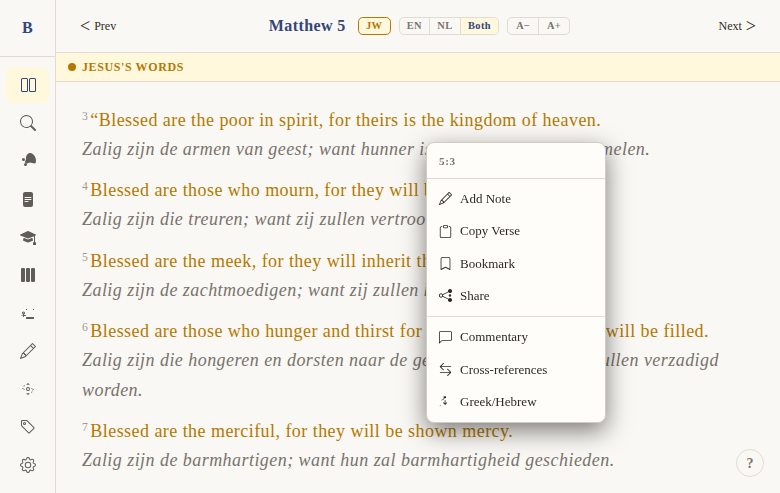
Copy verse to clipboard
Context
Problem: Users frequently want to share or save a specific verse — in a message, a document, or social media. They shouldn't have to manually select, copy, and type out the reference.
Solution: A one-click "Copy Verse" action in the verse context menu that copies both the verse text and its reference in a clean, shareable format.
Not included: Copying multiple verses at once, or copying with formatting (bold, italic). This copies plain text only.
Functional
When a user clicks "Copy Verse" from the verse context menu, the verse text and its reference are copied to the clipboard in a standard format.
User flow:
- User clicks a verse to open the context menu
- Clicks "Copy Verse"
- The verse text + reference is copied to clipboard
- User can paste it anywhere
Copy format: "In the beginning God created the heavens and the earth. (Genesis 1:1)"
The book name uses the current UI language — so in Dutch mode, it would be: "In den beginne schiep God den hemel en de aarde. (Genesis 1:1)"
Edge cases:
- If the clipboard API is unavailable (e.g., insecure context), the copy fails silently
- Very long verses copy completely — no truncation
UX & Design
No dedicated UI — this action lives entirely within the verse context menu. The menu item shows:
- Copy icon (left)
- "Copy Verse" label (right)
TODO: Add a brief toast notification ("Copied!") after successful copy.
Technical
Implementation: In handleContextAction on the read page:
const text = `${verse.text} (${localBookName} ${verse.chapter}:${verse.verse})`;
navigator.clipboard.writeText(text).catch(() => {});
localBookNameis the book name in the current UI language (EN or NL)- Uses
navigator.clipboard.writeText()with a silent catch on failure - No fallback for older browsers (clipboard API is widely supported)
Files:
apps/web/src/routes/(app)/read/[[book]]/[[chapter]]/+page.svelte—handleContextAction, line ~231
Status
Current: DONE Milestone: v1 Priority: Medium — frequently used utility
History:
- BibleGame had a copy-to-clipboard function in its context menu
- Same format preserved in web version
Dependencies:
- Requires: verse context menu (DONE), i18n book names (DONE)
Screenshots