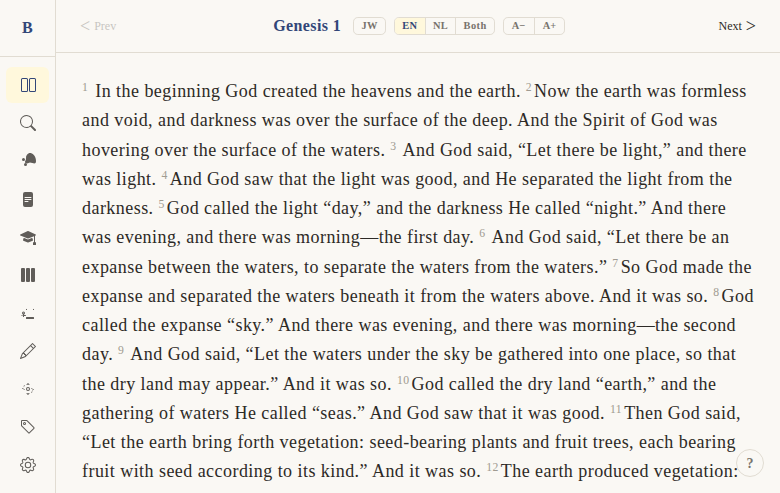
Font size controls
Context
Problem: Different users have different reading preferences and visual needs. Some want small text to see more content, others need large text for comfortable reading — especially on mobile devices or for users with visual impairments.
Solution: A 7-step font size scale with A+/A- buttons in the reader, plus a settings page with a visual picker. Three "comfort profiles" (Standard, Comfortable, Large & Clear) provide quick presets.
Not included: Per-verse font sizing or automatic font adjustment based on screen size. The font size applies uniformly to all reader text.
Functional
Users can increase or decrease the reader font size using A+ and A- buttons in the chapter navigation bar. The setting persists across sessions.
User flow:
- User opens the reader
- Text displays at the current font size (default: Medium/18px)
- Click A+ to increase one step, A- to decrease
- Text immediately updates across the entire reader
- Setting is saved automatically and persists on next visit
Comfort profiles (in Settings page):
- Standard: Light theme, Medium font (18px)
- Comfortable: Sepia theme, Large font (21px)
- Large & Clear: Sepia theme, XL font (24px), bold weight
Edge cases:
- At minimum (XS/14px), A- button is still clickable but doesn't go smaller
- At maximum (3XL/32px), A+ button is still clickable but doesn't go larger
- Font size also applies to notes list, bookmarks list, and other text-heavy pages
UX & Design
Font size scale (7 steps):
| Step | Size | Line Height |
|---|---|---|
| XS | 14px (0.875rem) | 1.6 |
| S | 16px (1rem) | 1.55 |
| M | 18px (1.125rem) | 1.5 — default |
| L | 21px (1.3125rem) | 1.45 |
| XL | 24px (1.5rem) | 1.4 |
| 2XL | 28px (1.75rem) | 1.35 |
| 3XL | 32px (2rem) | 1.3 |
Buttons: A- and A+ in the chapter nav bar, styled as small pill buttons.
Settings page: 7-button picker (XS through 3XL) with a live preview showing Genesis 1:1-2 at the selected size.
CSS custom properties:
--reader-font-size— applied to all reader text--reader-line-height— scales inversely with font size (larger text = tighter lines)--reader-font-weight— set by comfort profile (400 normal, 500 medium, 600 bold)
Technical
State management:
- Font size stored in
settings.svelte.tsas a key string ('xs' through '3xl') applyFontSizeToDom()sets CSS custom properties ondocument.documentElement- Persisted to
localStorageunderbibleweb_settings
Components:
ChapterNav.svelte— inline A-/A+ buttons (callincreaseFontSize()/decreaseFontSize())- Settings page — 7-button picker with live preview
VerseList.svelte— appliesfont-size: var(--reader-font-size, 1.125rem)
Files:
apps/web/src/lib/components/bible/ChapterNav.svelte— A-/A+ buttonsapps/web/src/lib/stores/settings.svelte.ts— font size state + persistenceapps/web/src/routes/(app)/settings/+page.svelte— settings picker + comfort profiles
Status
Current: DONE Milestone: v1 Priority: Medium — important for accessibility and comfort
History:
- BibleGame had 4 font sizes (Klein, Middel, Groter, Grootst — Dutch names)
- Web version expanded to 7 steps with added comfort profiles
- Line height scaling was added to prevent large text from feeling cramped
Dependencies:
- Requires: chapter reader (DONE), settings store (DONE)
- Used by: comfort profiles in settings page
Screenshots