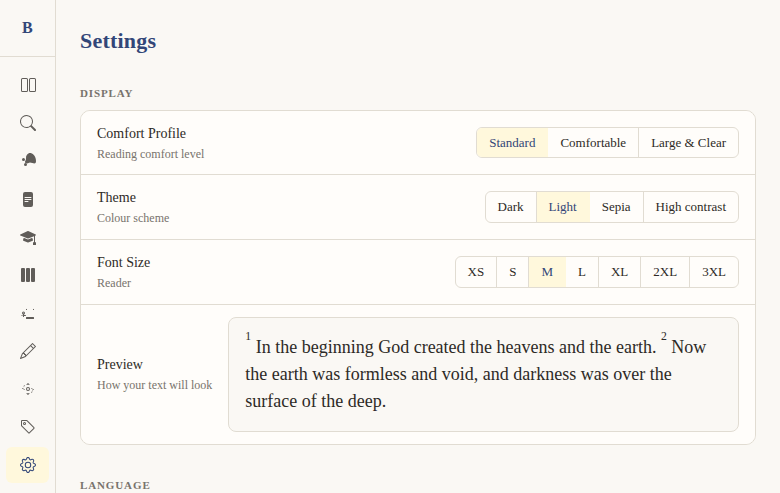
Settings page
Context
Problem: Users need a central place to customize their reading experience — font size, theme, language, translation preference, and account management.
Solution: A comprehensive settings page organized into clear sections: Display, Language, Bible Translation, Account, Data, and About. All settings persist to localStorage and take effect immediately.
Not included: Advanced settings like custom CSS, notification preferences, or keyboard remapping. This is focused on reading experience and account basics.
Functional
A single page at /settings with organized sections for all user preferences.
Sections:
- Display — Comfort profile (Standard/Comfortable/Large & Clear), theme (Dark/Light/Sepia/High contrast), font size (XS through 3XL), live preview
- Language — UI language toggle (English/Dutch)
- Bible Translation — Dropdown to select default translation (BSB or SV)
- Account — Current plan tier, email, upgrade link to /pricing
- Data — Export notes (JSON/Markdown, Premium-gated), clear all notes (with confirmation)
- About — Version (v0.0.1), BSB credit with link to berean.bible, TAGNT and OSHB credits
User flow:
- User navigates to
/settings - Changes any setting → effect is immediate (live preview for font/theme)
- Settings auto-save to localStorage
- No "Save" button needed — everything persists automatically
Edge cases:
- Comfort profiles apply multiple settings at once (theme + font size + font weight)
- Export notes button is gated behind Premium tier
- "Clear all notes" has a confirmation to prevent accidental deletion
UX & Design
Layout: Vertical sections with clear headings (Display, Language, etc.) Controls: Button groups for discrete options (theme, font size, language), dropdown for translation Live preview: Shows Genesis 1:1-2 at the selected font size and theme Responsive: Same layout on mobile, controls stack vertically
Technical
Route: /settings — apps/web/src/routes/(app)/settings/+page.svelte
State: All settings in settings.svelte.ts, persisted to localStorage under key bibleweb_settings. Includes: theme, fontSize, language, translation, comfortProfile.
Translation dropdown: Fetches /api/translations on mount to populate the select options.
Tier gating: Export notes uses TierGate component with feature="noteExport".
Files:
apps/web/src/routes/(app)/settings/+page.svelte— the pageapps/web/src/lib/stores/settings.svelte.ts— settings state + persistence
Status
Current: DONE Milestone: Foundation (pre-v1) Priority: Core — central configuration hub
Dependencies:
- Requires: settings store (DONE), translations API (DONE), tier system (DONE)
- Used by: all features that respect user preferences
Screenshots