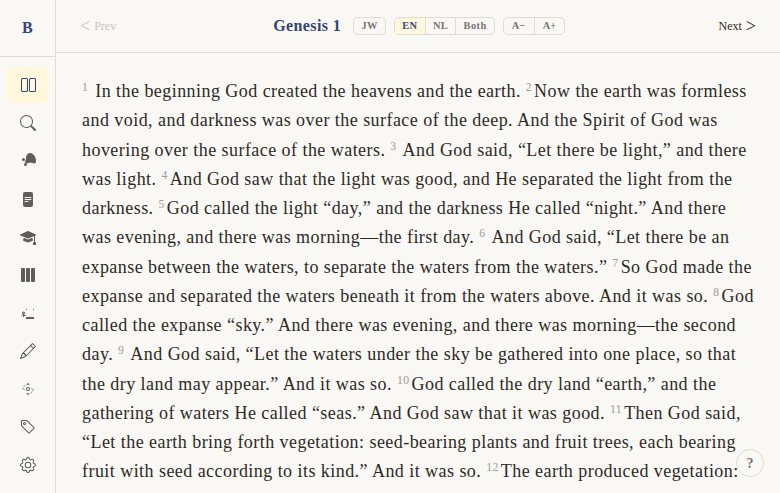
Sidebar navigation
Context
Problem: Users need persistent navigation to all major sections of the app without cluttering the reading area. The navigation should show what's available, indicate which features require a paid tier, and highlight the current page.
Solution: A vertical sidebar with icon + label navigation items, tier badges, and active-page highlighting. Collapses to a hamburger menu on mobile.
Not included: Customizable navigation order, favorites, or recent pages. The sidebar is a fixed navigation structure.
Functional
A vertical sidebar on the left side of the app showing all main navigation destinations.
Navigation items (in order):
- Whole Bible (reader) →
/read - Search →
/search - Theme Browser →
/themes - Parables →
/parables - Jesus' Teachings →
/teachings - Parallel Gospel Reader →
/parallel - Cross-References →
/crossrefs/43/3/16 - My Notes →
/notes - Ask AI →
/ask(badge: "Beta") - Pricing →
/pricing - Settings →
/settings - Activate (free tier only) →
/activate - Admin (admin users only) →
/admin
Active state: Current page is highlighted. Prefix matching for /read/* and /crossrefs/* routes.
Tier badge: Shown at the bottom of the sidebar, displaying the user's current plan (free/beta-low/beta-high/pro/premium/admin).
Edge cases:
- "Activate" link only appears for free-tier users
- "Admin" link only appears for admin users
- All labels are i18n-aware (switch to Dutch when UI language is NL)
- Feedback button at the bottom for user feedback
UX & Design
Layout:
- Fixed left sidebar, full viewport height
- "B" logo/brand mark at top
- Navigation items as icon + label rows
- Feedback button at bottom
- Tier badge below feedback
Active state: Left border accent + background highlight on current page item.
Mobile: Hidden by default, toggled via hamburger button (see Mobile Responsive Layout).
Technical
Component: Sidebar.svelte at apps/web/src/lib/components/layout/Sidebar.svelte
Nav items: Derived array, i18n-aware via t() function. Each item has href, label, icon.
Active detection: isActive(href) function with prefix matching for /read/ and /crossrefs/ routes.
Tier badge: Computed from betaTier prop passed from +layout.server.ts.
Conditional items: "Activate" shown when !betaTier || betaTier === 'free'. "Admin" shown when isAdmin flag.
Files:
apps/web/src/lib/components/layout/Sidebar.svelte— the componentapps/web/src/routes/(app)/+layout.svelte— mounts sidebar, passes betaTierapps/web/src/routes/(app)/+layout.server.ts— provides betaTier from session
Status
Current: DONE Milestone: Foundation (pre-v1) Priority: Core — primary navigation mechanism
History:
- BibleGame had a left-side menu panel with similar structure
- Web version adds tier badges and conditional items
Dependencies:
- Requires: routing (DONE), i18n (DONE), tier system (DONE)
- Used by: mobile responsive layout (DONE)
Screenshots