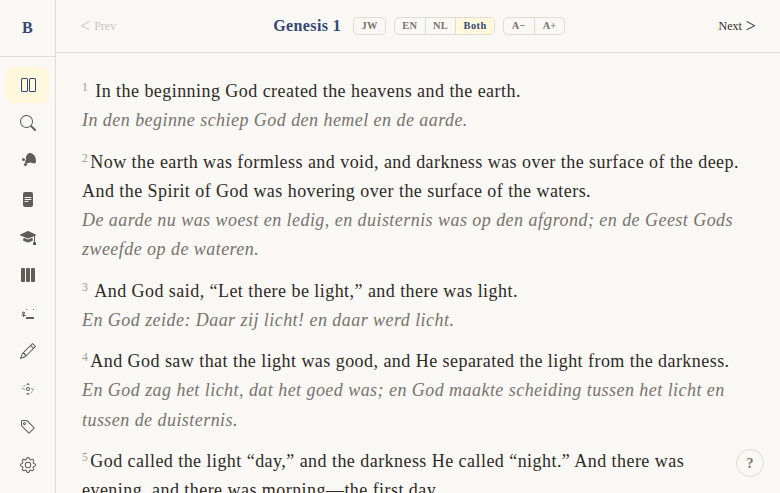
Dual translation side-by-side
Context
Problem: Bilingual users and Bible students often want to compare the English and Dutch texts verse by verse. Switching back and forth between language modes is cumbersome — they want to see both at once.
Solution: A three-way toggle (EN / NL / Both) that lets users view English only, Dutch only, or both translations displayed together verse by verse. In "Both" mode, each verse shows the BSB text on one line and the Statenvertaling below in italics.
Not included: Side-by-side column layout (like a parallel Bible with two columns). The "Both" mode is vertically stacked — English on top, Dutch below, for each verse.
Functional
In the reader's navigation bar, three buttons let you choose your translation mode. "Both" mode shows every verse twice — first in English, then in Dutch italics below.
User flow:
- User sees the EN/NL/Both toggle buttons in the chapter navigation bar
- Click "EN" → only BSB English text shown
- Click "NL" → only Statenvertaling Dutch text shown
- Click "Both" → each verse shows BSB text followed by SV text in italics
- Keyboard shortcut: press
Tto cycle through EN → NL → Both → EN
Where it works:
- Main reader (/read)
- Parallel Gospel view (/parallel)
- Themes and parables pages (/themes, /parables)
Edge cases:
- In "Both" mode, if a verse has no Dutch text (text_nl is NULL), only the English line appears
- Translation mode is local per page — not persisted across pages or sessions
- Default mode is based on UI language setting (Dutch UI → NL mode, English UI → EN mode)
UX & Design
Toggle buttons (in ChapterNav):
- Three pill-shaped buttons: EN | NL | Both
- Active state: pressed/filled appearance
- Position: center of the navigation bar between book picker and font controls
Both mode rendering:
- English line: normal weight, standard text color, verse number as superscript
- Dutch line: italic font-style,
var(--color-description)(muted/secondary color) - Each verse occupies a block
<div>(not inline<span>as in single-language mode) - Visual spacing between verse pairs
Keyboard shortcut: T key cycles through modes (shown in keyboard help overlay)
Technical
State: translationMode: 'en' | 'nl' | 'both' — local $state on each page component, initialized from settings.language (so Dutch-UI users default to NL mode).
Rendering logic (VerseText.svelte):
- Single mode (
enornl): renders one inline<span>withprimaryText(which isnlTextfor NL,enTextfor EN) - Both mode: renders two
<div>blocks — first withverse.text(BSB), second withverse.textNl ?? verse.textin italic--color-descriptionstyling
Toggle UI (ChapterNav.svelte):
- Three
lang-pillbuttons emittingontranslationchangeevent cycleTranslationMode()function in the read page cycles through['en', 'nl', 'both']onTkey press
Parallel Gospels (ParallelVerseView.svelte):
- Same pattern:
{#if translationMode === 'both'}renders.gospel-verse__text-wrapwith both texts - NL text gets
.gospel-verse__text--nlclass (italic, muted)
Files:
apps/web/src/lib/components/bible/VerseText.svelte— primary dual render logicapps/web/src/lib/components/bible/VerseList.svelte— passestranslationModeto VerseTextapps/web/src/lib/components/bible/ChapterNav.svelte— EN/NL/Both toggle buttonsapps/web/src/lib/components/bible/ParallelVerseView.svelte— parallel gospel dual renderapps/web/src/routes/(app)/read/[[book]]/[[chapter]]/+page.svelte—translationModestate, T shortcut
Status
Current: DONE Milestone: Foundation (pre-v1) Priority: Core — essential for bilingual users
History:
- BibleGame desktop app had a similar EN/NL toggle but without the "Both" mode
- "Both" mode was a web-specific addition — one of the first UX improvements over the desktop version
- The
Tkeyboard shortcut was added for power users who switch frequently
Dependencies:
- Requires: BSB English text (DONE), Statenvertaling Dutch text (DONE)
- Used by: parallel gospels, themes, parables (all reuse the same toggle pattern)
Screenshots