Dutch UI language
Context
Problem: BibleWeb serves Dutch-speaking users who may not be comfortable navigating an English-only interface. The entire app UI — menus, buttons, labels, messages — needs a Dutch version.
Solution: A complete i18n (internationalization) system with Dutch translations for every UI string in the app. Users toggle between English and Dutch in Settings. This is independent of the Bible translation — you can read BSB English with a Dutch UI, or Statenvertaling with an English UI.
Not included: Other UI languages (German, French, etc.). The system supports it architecturally, but only English and Dutch are implemented.
Functional
Users can switch the entire app interface to Dutch via a toggle in Settings. All navigation labels, buttons, headers, context menus, book names, theme names, and parable descriptions switch to Dutch.
User flow:
- User opens Settings → Language section
- Clicks "Dutch" button (or "English" to switch back)
- Entire UI immediately switches language — all menus, labels, and navigation update
- The setting persists across sessions
What gets translated:
- Sidebar navigation (e.g., "Whole Bible" → "Hele Bijbel", "Search" → "Zoeken")
- Chapter navigation buttons and labels
- Context menu items ("Add Note" → "Notitie toevoegen")
- Settings page labels and descriptions
- Book names (e.g., "Genesis" stays "Genesis", "Matthew" → "Mattheüs")
- Pericope titles in Parallel Gospels
- Theme names in Theme Browser
- Parable descriptions
- Error messages and empty states
- Keyboard shortcut hints
Edge cases:
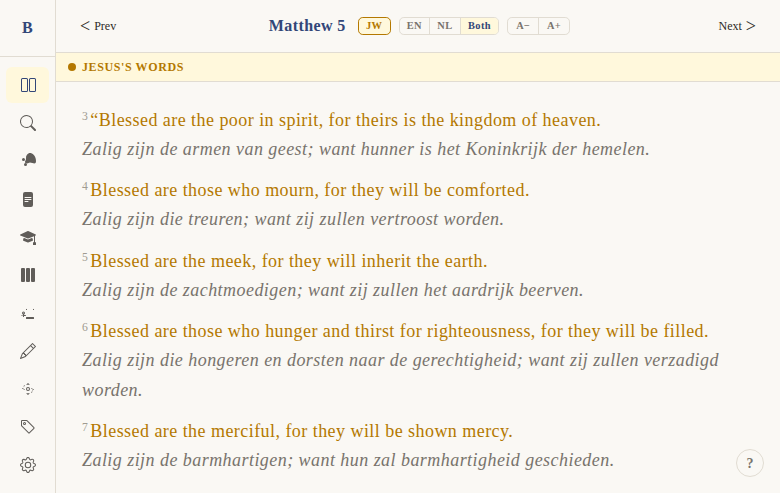
- Bible text language is controlled separately (EN/NL/Both toggle) — not affected by UI language
- Book names in some contexts use short names (e.g., "Gen", "Matt" / "Mat")
- If a translation key is missing in Dutch, the English string is used as fallback
UX & Design
Settings toggle:
- Section: "Language"
- Label: "UI Language" / "Interface"
- Two buttons: "English" | "Dutch" (button group, same style as theme/font toggles)
No visual distinction — Dutch UI looks identical to English, just with translated text. All layouts, colors, and icons remain the same.
Technical
i18n system (apps/web/src/lib/i18n/):
index.ts— public API. Maintains a cache of locale modules. Bothenandnlare statically imported (pre-populated at module load).t(key, lang, ...args)— looks up a string key from the active locale, falls back to English. Supports{0}/{1}placeholder formatting.- Helper functions:
getBookName(id, lang),getBookShortName(id, lang),getPericopeTitle(englishTitle, lang),getThemeName(englishName, lang),getParableDescription(...),getPericopeDescription(...)
Locale files:
en.ts— default export: English string map (~400+ lines). Named exports:bookNames(66 entries),bookShortNames,pericopeTitles,themeNames,parableDescriptions,pericopeDescriptionsnl.ts— same structure in Dutch. Complete translations of all UI strings. Dutch book names (e.g., book 40 = "Mattheüs", book 43 = "Johannes")
Settings persistence:
settings.language: 'en' | 'nl'insettings.svelte.ts, persisted tolocalStorageunderbibleweb_settingssetLanguage(lang)writes to state and persists
Usage pattern in components:
import { settings } from '$lib/stores/settings.svelte';
import { t } from '$lib/i18n';
const lang = $derived(settings.language);
// Then in template: {t('nav.search', lang)}
Server-side: +page.server.ts returns both bookName (English) and bookNameNl (Dutch) for the reader page title.
Files:
apps/web/src/lib/i18n/index.ts— i18n engine,t()function, helper functionsapps/web/src/lib/i18n/en.ts— English strings + book names (~400+ lines)apps/web/src/lib/i18n/nl.ts— Dutch strings + book names (~400+ lines)apps/web/src/lib/stores/settings.svelte.ts—settings.language,setLanguage()apps/web/src/routes/(app)/settings/+page.svelte— EN/NL toggle UI
Status
Current: DONE Milestone: Foundation (pre-v1) Priority: Core — essential for Dutch-speaking target audience
History:
- Dutch UI was implemented early — the settings store originally used Dutch font-size key names (
'klein','middel','groter','grootst') before internationalization - The i18n system was built specifically for EN/NL — not a generic framework
- Both locale files are statically imported (no lazy loading) for instant switching
Dependencies:
- Requires: settings store (DONE)
- Used by: all components that display text labels
Screenshots